
Creating Custom Contexts
Contexts are used to manage and maintain states and functionality that can be shared across different components and behaviors. Some examples of custom components include:
- A custom material
- The value of a score
- The time remaining in a game experience
Creating Custom Contexts
Section titled “Creating Custom Contexts”To add a new custom context to your Mattercraft project:
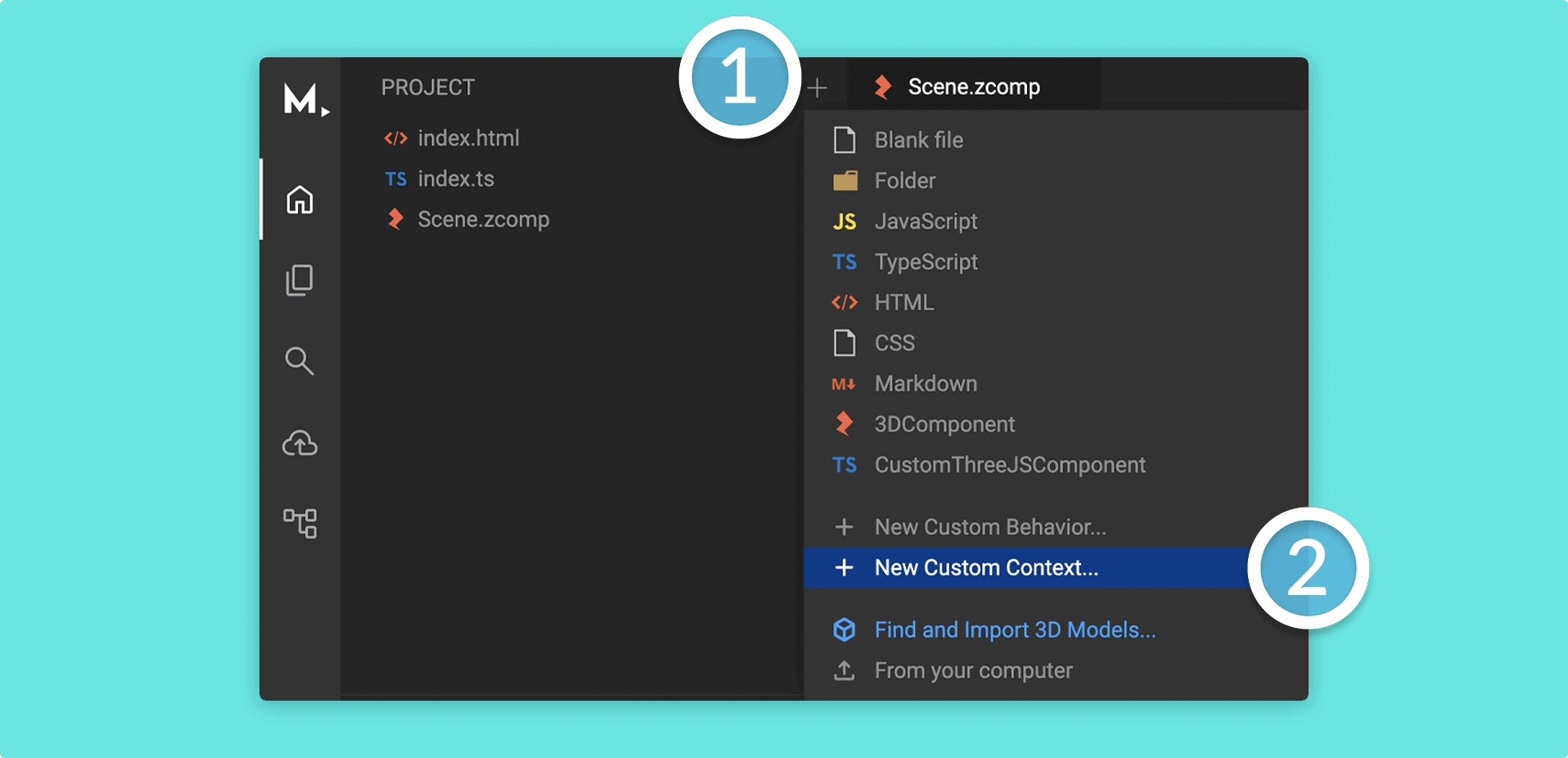
- Click on the Left Menu
- Click the + (plus) icon button to the top of the panel and click on + New Custom Context
- Type a name for the context then click Create
- The Left Menu will now have this context script file with the skeleton of a brand new context
Custom Context structure
Section titled “Custom Context structure”Let’s look at the basic structure of a context:
import { Context, ContextManager, zContext } from "@zcomponent/core";
interface ConstructionProps {  // Add any constructor props you’d like for your context here}
@zContext()export class MyContext extends Context<ConstructionProps> {
  // You can declare variables here if you’d like
  constructor(contextManager: ContextManager, constructorProps: ConstructionProps) {    super(contextManager, constructorProps);  }
  // You can declare functions here if you’d like
}
The
@zContextdecorator tells the Mattercraft editor that you’d like this script to appear as a context in your experience.
Contexts are JavaScript or TypeScript classes that extend the Context base class provided by Mattercraft.
See Mattercraft’s full API documentation here.
Using Custom Contexts
Section titled “Using Custom Contexts”You can use custom contexts in custom behaviors and custom components. For example, the following code shows creating a score using a custom context and then displaying it in your zcomp via a custom behavior.
ScoreContext
import { Context, ContextManager, Observable, zContext } from "@zcomponent/core";
interface ConstructionProps {  // Add any constructor props you’d like for your context here}
@zContext()export class ScoreContext extends Context<ConstructionProps> {
  // Create a variable called currentScore which  // you can use in other custom scripts  public currentScore = new Observable<number>(0);
  constructor(contextManager: ContextManager, constructorProps: ConstructionProps) {    super(contextManager, constructorProps);  }}
// Create a function which can be used to get the current scoreexport function useCurrentScore(contextManager: ContextManager) {  return contextManager.get(ScoreContext).currentScore;}
DisplayBehavior
import { Behavior, ContextManager, zBehavior } from '@zcomponent/core';import { Div } from '@zcomponent/html/lib/div';import Scene from './Scene.zcomp';import { ScoreContext } from './ScoreContext';
@zBehavior({ icon: 'scoreboard' })export class ScoreDisplayBehavior extends Behavior<Div> {
  protected zcomponent = this.getZComponentInstance(Scene);
  constructor(contextManager: ContextManager, instance: Div, protected constructorProps: {}) {    super(contextManager, instance);
    // Get the score context    const scoreContext = contextManager.get(ScoreContext);
    // Display the current score in this instance    // (a HTML Div in this example)    this.register(scoreContext.currentScore, score => {      instance.element.innerHTML = score.toString();    });  }}
We use
this.register()here becausecurrentScoreis anObservable. For a complete guide on when to use@zObserve()vsthis.observe()vsthis.register(), see Reacting to Value Changes.
Properties
Section titled “Properties”Just as with custom behaviors and custom components, you can add properties to your contexts that can be controlled from the 3D editor.
For more information about controlling properties, see our dedicated Properties article.